Photoshop adds Lightroom-style lighting controls and AI Markup drawing tool
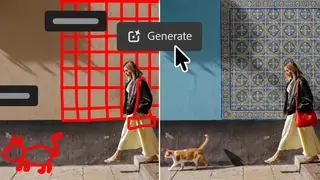
Adobe's latest Photoshop update introduces a Light Adjustment Layer with exposure, contrast, and other lighting controls for non-destructive edits. A new Markup feature lets users draw directly on images to guide AI generation, while Instruct Edit with Masks uses Firefly Image 5 for precise edits. The AI Assisted Editor beta groups these tools with a natural-language prompt bar.
The update marks a notable convergence between Adobe's two flagship applications, addressing a long-standing workflow gap for photographers who previously had to switch between programs for RAW-quality lighting adjustments. The Light Adjustment Layer operates non-destructively, preserving the original image data while allowing exposure, contrast, highlights, shadows, whites, and blacks to be modified within Photoshop's existing layer system.
The AI features build on Adobe's Firefly Image 5 model, with the Markup tool representing a shift toward more intuitive visual prompting rather than text-only instructions. Users can sketch rough shapes or arrows directly on images to communicate desired changes. The AI Assisted Editor beta consolidates seven AI-powered tools into a single interface with a natural-language prompt bar, while Dynamic Text and Stock Panel Integration expand creative options with custom shapes and access to over 900 million stock assets.
This update could significantly streamline professional creative workflows, potentially reducing time spent switching between applications and making sophisticated editing more accessible to casual users. The AI-assisted tools may lower barriers for those without formal design training, though they could also raise questions about image authenticity as photorealistic elements become easier to generate. Photographers and designers may need to adapt their practices, while clients and audiences might increasingly encounter images where AI-generated components are indistinguishable from captured reality.