Customize Android Auto to reduce clutter and boost safety
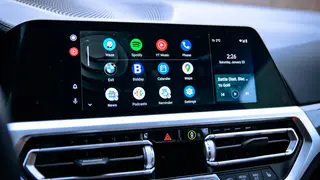
Android Auto offers extensive customization options that many users overlook, such as editing the launcher to hide unused apps and adjusting settings for reduced distraction. The platform also includes hidden developer features and support for Google's Gemini assistant, allowing drivers to tailor the interface to their preferences. Simple tweaks can significantly improve usability for both occasional and daily drivers.
Android Auto's default home screen often displays numerous apps that drivers rarely need, creating unnecessary visual clutter. The launcher customization menu allows users to hide unused tools and reorder remaining icons by priority, which can reduce the time spent glancing at the infotainment display while driving.
Hidden developer settings, unlocked by repeatedly tapping the version number, provide deeper control. Users can force wireless connections, though this drains battery faster and introduces lag, or adjust video resolution for crisper visuals on slower networks. The platform also integrates Google's Gemini assistant, expanding voice-control possibilities beyond standard commands.
This story could affect the millions of drivers who rely on Android Auto daily. Reduced on-screen clutter may translate to fewer distracted glances and safer driving habits. However, the customization options require setup time and technical comfort, potentially leaving less engaged users behind. The availability of developer features and AI assistance could also shift expectations for in-car technology, pressuring automakers to keep interfaces flexible and up to date.