How to Digitize Physical Cards and Tickets in iPhone Wallet
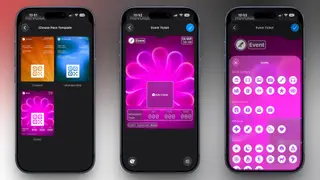
A guide explains how iOS 27 lets iPhone owners turn physical tickets, gift cards, and loyalty cards into digital passes in Apple Wallet. It covers scanning cards with Visual Intelligence, customizing templates, and managing the passes. The article notes benefits such as easier organization and reduced risk of losing physical cards.
iOS 27 adds a way for iPhone users to make digital passes from physical items that lack official Wallet support. The Wallet app can scan paper tickets, plastic membership cards, gift cards, and loyalty cards, then place recognized details into structured fields.
Visual Intelligence reads printed information such as names, dates, locations, ticket types, and contact details, matching it to a pass template. Users can review and edit labels, add notes, or change appearance before saving. Barcodes and QR codes remain scannable at venues or checkout.
This feature could make everyday errands and event entry more convenient for iPhone owners who often carry paper tickets or plastic cards. People may benefit from having passes organized in one app and from lowering the chance of losing a physical item. Venues and retailers might see more screen-based scanning, though some users may still prefer physical backups or face compatibility limits. Overall, the change may gradually normalize digital wallets for small, non-official passes.