Smart Action Notch App Converts Camera Cutout Into Gesture-Based Shortcut Menu
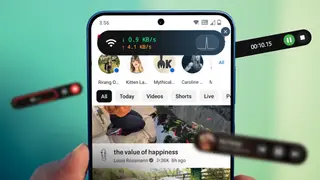
The Smart Action Notch app transforms the otherwise unused space around a phone's front-facing camera cutout into a functional gesture-controlled shortcut hub for frequently accessed actions. Users can assign different commands to tap, double-tap, long press, or swipe gestures to trigger system functions like taking screenshots or toggling the flashlight without navigating through menus. The app also offers advanced features including a favorites menu, text scanning via OCR, and quick note-taking capabilities.
The Smart Action Notch app leverages Android's accessibility service framework to detect user interactions around the phone's front-facing camera cutout and map them to customizable commands. By supporting multiple gesture types—single tap, double-tap, long press, and swipe—the application allows users to prioritize frequently accessed functions based on activation frequency. The author's implementation demonstrates practical workflow optimization, assigning time-sensitive actions like flashlight activation to quick taps while reserving more deliberate gestures for less urgent tasks.
The app's capabilities extend beyond basic system controls to include specialized features such as optical character recognition for text extraction, a customizable favorites menu for app access, and note-taking functionality. Users can further enhance their shortcut ecosystem by pairing Smart Action Notch with complementary apps like Glyf: Draw to Launch, creating multi-layered gesture systems that reduce reliance on traditional navigation methods and menu systems.
This solution could appeal to productivity-focused smartphone users seeking to minimize navigation friction in daily workflows. The approach may encourage broader software adoption patterns where previously unused interface elements become functional extensions, potentially influencing app design philosophy. However, widespread implementation could fragment user experiences across devices with different hardware designs, and reliance on accessibility services for shortcut functionality might raise questions about battery efficiency and system resource allocation. The impact would likely remain concentrated among technically engaged users rather than mainstream audiences.