Xiaomi Phones: A Guide to Turning On the Performance Monitor Overlay
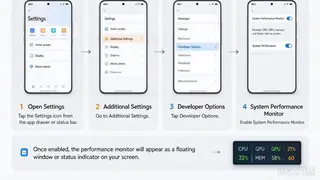
Xiaomi devices vary in the performance overlays they offer, depending on model and MIUI or HyperOS version. The article explains how to enable Developer options and locate the relevant monitoring settings. It also notes that users may need a third-party floating window for details such as memory or network activity.
Xiaomi’s monitoring features are not uniform. What appears depends on the handset, software branch, and whether the user seeks a native indicator or a separate floating tool. Some overlays focus on processor load, while frame rate, refresh rate, memory, and network data may require different sources.
Developer options can expose a CPU activity display, but this is not a full dashboard. It may lack temperature, battery, or gaming FPS data, and its position might be fixed. Movable third-party monitors often need permission to appear above other apps.
For everyday Xiaomi users, easier access to performance overlays could make lag and app demands more legible, helping gamers, remote workers, and travelers decide when an app or connection is struggling. It may also encourage more tinkering with hidden settings, which can confuse less technical owners or raise privacy questions around floating-window permissions. Overall, the impact is likely modest: a diagnostic convenience rather than a broad social shift, though it may shape how some users judge device performance.